

In the dynamic world of the internet, websites frequently change their IP addresses for various reasons. While this is a standard part of web maintenance, it can lead to connectivity issues. This is where the concept of ‘Flush DNS’ comes into play, an essential troubleshooting step for anyone facing website access problems.
Table of Contents
What is DNS Flush and Why Should You Care?
If you’ve ever encountered a website that seems to have vanished or isn’t loading correctly, you might have been advised to perform a DNS flush. But what does that actually mean? Let’s dive into the world of DNS, how it works, and why a DNS flush might be your ticket to smoother internet browsing.
What is DNS?
DNS (Domain Name System) is like the internet’s phonebook. It helps translate human-readable domain names (like example.com) into IP addresses (like 192.168.1.1), which computers use to communicate with each other.
Why Do We Need DNS?
When you type a website’s address in your browser, your device doesn’t actually understand domain names. It queries a DNS server to get the corresponding IP address for that domain, which allows your browser to connect to the correct server.
What Is DNS Caching?
To reduce the time it takes to perform a DNS lookup, most operating systems and devices cache DNS results locally. This means that if you visit a website frequently, your device will remember the IP address without having to ask a DNS server every time. However, sometimes this cached data can become outdated or corrupted.
What Is DNS Flush?
A DNS flush clears the local cache of DNS records on your device. This forces the system to obtain fresh DNS data the next time you try to visit a website. It’s useful if:
- You want to refresh your DNS settings after changes to network configurations.
- A website has changed its IP address, but your system still holds the old one.
- You’re experiencing connection issues due to corrupt DNS entries.
Why Perform a DNS Flush?

1. Website Changes IP Address
Websites sometimes change their IP addresses, either due to server migrations or DNS configurations. If your device still holds the old IP address in its DNS cache, it might not load the website properly. Flushing the DNS forces your device to request the updated IP address from a DNS server.
2. Resolve DNS Cache Corruption
Over time, DNS cache can become corrupted. This corruption can occur due to system crashes, malware, or network issues, which can lead to incorrect or incomplete DNS records. A DNS flush clears the corrupt entries, helping to restore proper functionality.
3. Fix Connection Issues
Sometimes, clearing the DNS cache resolves network problems like:
- Websites not loading despite being accessible from other devices.
- Errors such as “DNS_PROBE_FINISHED_BAD_CONFIG” or “DNS_PROBE_FINISHED_NXDOMAIN” in browsers. Flushing the DNS resets the cached addresses, forcing the system to retrieve fresh, accurate data.
4. Changing DNS Servers
When you switch your DNS servers (e.g., switching from your ISP’s DNS to a public DNS like Google’s 8.8.8.8 or Cloudflare’s 1.1.1.1), your device may still rely on the old DNS cache. A flush clears out cached entries associated with the old DNS server, ensuring that new DNS queries are directed to the correct servers.
5. Improving Privacy
The DNS cache stores a list of all domain names your device has queried. If you’re concerned about privacy, especially on shared or public devices, flushing the DNS can help remove traces of browsing activity.
6. After System or Network Changes
If you’ve made changes to your network settings (such as new routers, firewalls, or VPN configurations), flushing the DNS cache helps to ensure that these changes are applied properly. This prevents old configurations from interfering with the new network setup.
7. Malware or Adware Removal
Certain types of malware or adware can manipulate DNS settings and cache to redirect you to malicious websites. After removing such malware, a DNS flush can ensure that any lingering malicious DNS records are erased.
8. Reduce DNS Errors
Sometimes, minor issues with DNS records can cause recurring errors when accessing certain websites. A DNS flush can reset these errors and allow normal access to websites again.
How to Flush DNS?
Here’s how you can flush the DNS cache on different systems:
Windows
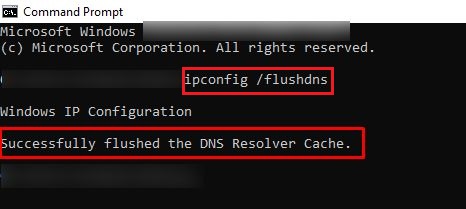
- Open Command Prompt as an administrator.
- Run the following command:

3.You’ll receive a confirmation message that the DNS Resolver Cache was successfully flushed.
MacOS
- Open the Terminal.
- Depending on your macOS version, use one of these commands:

3. No confirmation is shown, but the DNS cache will be cleared.
Linux
- For most Linux systems, DNS cache flushing depends on the specific service you are using. For
systemd-resolved(common on newer distros):

When to Use DNS Flush
You might want to flush your DNS if:
- Websites are not loading properly, even though they are up.
- You’ve recently changed DNS settings or servers.
- Your DNS cache has potentially become corrupted.
- You want to ensure privacy by clearing cached DNS queries.
Conclusion
When experiencing connection issues or seeing incorrectly displayed web pages, your system might be storing corrupted or outdated DNS cache records. You can quickly solve it by using flush DNS command. If doing so doesn’t resolve the problem, try to clear your web browser cache instead.
We hope you find this article helpful in solving DNS server issues. Good luck.