

Table of Contents
When you host your website or application on the web, you need a control panel to manage various aspects of your server. The choice of control panel largely depends on your hosting provider and factors such as pricing and ease of use. You need to use a control panel that is price friendly and easy to use.
What is Plesk?

Plesk is a commercial web hosting control panel that simplifies the management of web servers and websites. It provides a user-friendly interface for managing various aspects of web hosting, including website files, databases, email accounts, domain names, and server settings. Plesk supports both Windows and Linux operating systems, making it versatile for different server environments.
Key features of Plesk:
Website Management: Users can create, modify, and manage websites easily through Plesk. This includes tasks such as uploading and managing website files, configuring domains and subdomains, and setting up domain aliases.
Email Management: Plesk allows users to manage email accounts, mailboxes, and email forwarding. It often includes features like spam filtering, antivirus protection, and the ability to set up autoresponders.
Database Management: Plesk supports popular database management systems like MySQL and PostgreSQL. Users can create and manage databases, database users, and database privileges.
Domain Management: Users can register new domains, configure domain settings, and manage domain aliases through the Plesk control panel.
Server Configuration: Plesk provides tools for configuring server settings, managing server resources, and monitoring server performance. This includes settings related to security, PHP configuration, and server-level parameters.
Security: Plesk includes security features such as firewalls, SSL certificate management, and tools for securing websites and applications. It helps users implement security best practices to protect their hosting environment.
Application Deployment: Plesk often comes with one-click installers for popular web applications and content management systems (CMS), making it easy to deploy applications like WordPress, Joomla, and others.
Backup and Restore: Plesk provides tools for backing up and restoring websites and server configurations. This is crucial for data protection and disaster recovery.
Reseller Hosting: Hosting providers use Plesk to offer reseller hosting services. Plesk allows resellers to manage multiple hosting accounts, each with its own set of resources and configurations.
Access the Plesk Login Page:
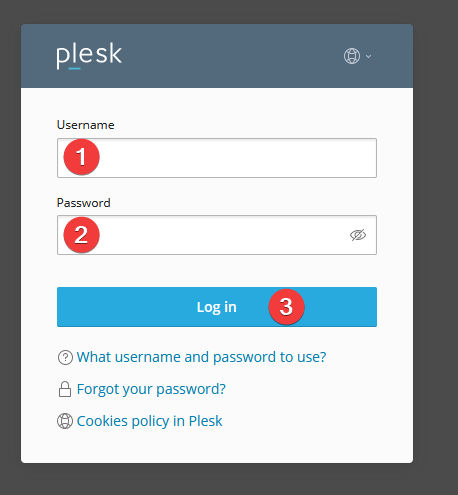
Open your web browser.
Enter the URL for the Plesk login page. This is often in the format of https://yourdomain.com:8443 or https://your-server-IP:8443.
Replace “yourdomain.com” or “your-server-IP” with the actual domain name or IP address of your server.
Enter Your Login Credentials:
On the Plesk login page, you should see fields for entering your username and password.
Enter the username and password provided to you by your hosting provider or system administrator.
Click “Log In” or “Sign In“:
After entering your credentials, click the “Log In” or “Sign In” button to access the Plesk control panel.
Navigate the Plesk Control Panel:
Once logged in, you’ll be directed to the Plesk control panel interface. From there, you can manage various aspects of your web hosting environment, including websites, domains, email accounts, databases, and server settings.
Advantages of Plesk Panel:

User-Friendly Interface:
Plesk provides a user-friendly and intuitive web-based interface, making it accessible to users with varying levels of technical expertise.
Cross-Platform Support:
Plesk supports both Windows and Linux operating systems, offering flexibility for users who work in different server environments.
Comprehensive Feature Set:
Plesk offers a wide range of features for web hosting management, including website management, email administration, database management, security tools, and more.
Security Features:
Plesk includes built-in security features, such as SSL certificate management, firewalls, and security advisories, helping users implement best practices to secure their hosting environments.
Application Deployment:
Plesk simplifies the deployment of web applications and content management systems through one-click installers, making it easy to set up popular applications like WordPress, Joomla, and others.
Reseller Hosting Support:
Plesk is commonly used for reseller hosting, allowing hosting providers to manage multiple hosting accounts and allocate resources for resellers.
Backup and Restore:
Plesk provides tools for automated backup and restore, helping users safeguard their data and easily recover in case of data loss.
Multi-Language Support:
Plesk supports multiple languages in its interface, making it accessible to users around the world.
Disadvantages of Plesk Panel:
Cost:
Plesk is a commercial product, and users typically need to pay a licensing fee based on the number of domains or servers they intend to manage. This cost can be a factor for budget-conscious users.
Resource Usage:
Some users may find that Plesk consumes more system resources compared to lighter control panels, potentially affecting server performance, especially in resource-constrained environments.
Learning Curve:
While Plesk is designed to be user-friendly, users who are new to web hosting management may still face a learning curve. This is common with any comprehensive control panel.
Customization Limitations:
Users looking for extensive customization options might find Plesk to be less flexible compared to open-source alternatives, where users have more control over the configuration.
Dependency on Hosting Provider:
The availability of specific features and updates may depend on the hosting provider’s configurations and policies, limiting user control in certain cases.
Less Open Source:
Plesk is not an open-source solution, which means users do not have access to the source code. This can limit the ability to modify or customize the control panel extensively.
Occasional Updates:
Users may experience occasional delays in receiving updates, especially if the hosting provider is responsible for managing the Plesk installation.
Plesk Alternatives
cPanel:
Overview: cPanel is one of the most widely used web hosting control panels. It is known for its user-friendly interface and robust feature set.
Pros: Intuitive interface, extensive documentation, widely supported by hosting providers.
Cons: Generally associated with Linux hosting, requires a license fee.
DirectAdmin:
Overview: DirectAdmin is a lightweight and efficient control panel that offers a clean interface and essential features for server management.
Pros: Lightweight, resource-efficient, reasonably priced.
Cons: Might have fewer features compared to cPanel or Plesk.
 uladminuser